
Route line, markers, tracker and music
Everything in the Style tab: how the route is drawn, marker and tracker styles, uploading your own tracker, shadows and sound.
Route line styles
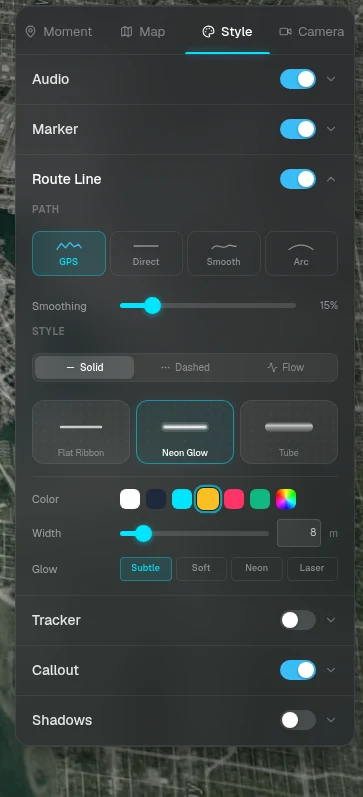
Choose how the route is drawn and its color. The animated styles move along the route as it plays.

Flat Ribbon
Solid

Neon Glow
Solid

Tube
Solid

Short Dash
Dashed

Long Dash
Dashed

Dotted
Dashed

Arrow
Dashed

Highway Track
Animated

Neon Sparks
Animated

Chevron
Animated
Path shape
Decide how the line connects your points.
- — GPS: follows the recorded track exactly (needs a GPS file)
- — Smooth: gentle curves between moments
- — Direct: straight lines between moments
- — Arc: great-circle arcs, good for flights
Marker styles
The marker is the pin that shows each moment on the map. Set a style and color for the story here, or change it for one moment in the Moment tab.

Numbered Stop

Flag Start

Flag Finish

Pin

Ball Pin

Pulse

Impact

Rift

Frost

Portal

Beacon

Crosshair
Tracker styles
The tracker is what travels along the route as the story plays: a glowing dot, a compass arrow, or a 3D car, boat, airplane or hiker.
- — Upload your own: an image (SVG, PNG, WebP or JPG) or a 3D model (.glb, up to 50 MB)
- — The number of uploaded trackers you can keep depends on your plan

Glowing Dot

Ring Pulse

Compass Arrow

Spark

Paper Plane
Callout defaults and shadows
Callout sets the card style, light or dark theme and accent colors used by every moment that doesn't override them. Shadows turns on shadows under the route and the tracker.
Moments and calloutsMusic and sound effects
Give the story a soundtrack.
- — Background Music: pick a track from the library and set the volume. Music fades in and out automatically
- — Cinematic Sound Effects: map and motion sounds synced to the story
- — Plus: upload your own music (MP3, M4A or OGG, up to 15 MB)
- — Choose whether exported videos include the audio
Ready to tell your story?
Turn your GPS track into an interactive, cinematic 3D map in just a few clicks.
Start your first story